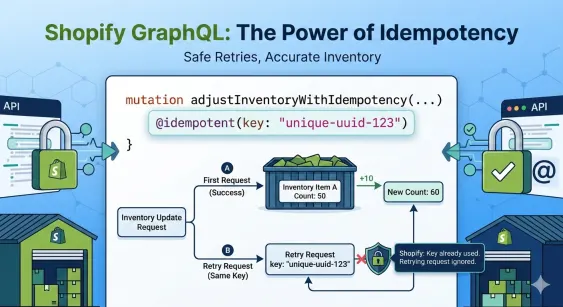
If you’ve ever built an integration with Shopify, you know the "inventory anxiety." You send a request to update stock levels, the network hiccups, and you’re left wondering: Did that go through? If you retry, you risk doubling the adjustment. If you don't, your stock counts drift. Shopify’s introduction of idempotency keys in their GraphQL API is the definitive "peace of mind" feature for developers.
What is Idempotency?
In the world of APIs, an idempotent operation is one that can be performed multiple times without changing the result beyond the initial application.
With the inventorySetQuantities or inventoryAdjustQuantities mutations, providing an idempotencyKey ensures that if you send the exact same request twice (due to a timeout or retry logic), Shopify recognises the key and ignores the second attempt, returning the cached response from the first successful call.
How to Implement It
To use idempotency, you simply include the idempotencyKey argument in your mutation. This key should be a unique string (like a UUID) generated by your system for that specific business action.
Structuring a call to adjust inventory levels safely
GraphQL
mutation adjustInventoryWithIdempotency($input: InventoryAdjustQuantitiesInput!) {
  inventoryAdjustQuantities(input: $input) @idempotent(key: "unique-uuid-128934") {
    inventoryLevels {
      id
      quantities(names: ["available"]) {
        name
        quantity
      }
    }
    userErrors {
      field
      message
    }
  }
}
The Variables Object
{
  "input": {
    "reason": "restock",
    "name": "available",
    "changes": [
      {
        "delta": 10,
        "inventoryItemId": "gid://shopify/InventoryItem/12345678",
        "locationId": "gid://shopify/Location/87654321"
      }
    ]
  }
}
Why This Matters for Your Store
- Prevent Double-Counting: Essential for high-volume flash sales where every unit counts.
- Reliable Retries: You can safely wrap your API calls in a
whileloop or a background job queue that retries on 5xx errors. - Consistency: Keeps your Warehouse Management System (WMS) and Shopify perfectly in sync, even when the internet is being flaky.
Key Rules to Remember
- Unique Keys: Never reuse a key for a different set of changes.
- Timeouts: If your first request timed out but was actually processed by Shopify, the second request with the same key will simply return the result of that first success.
- Payload Matching: If you send the same
idempotencybut change thedeltavalue in the body, Shopify will return an error because the payload doesn't match the original key's intent.